
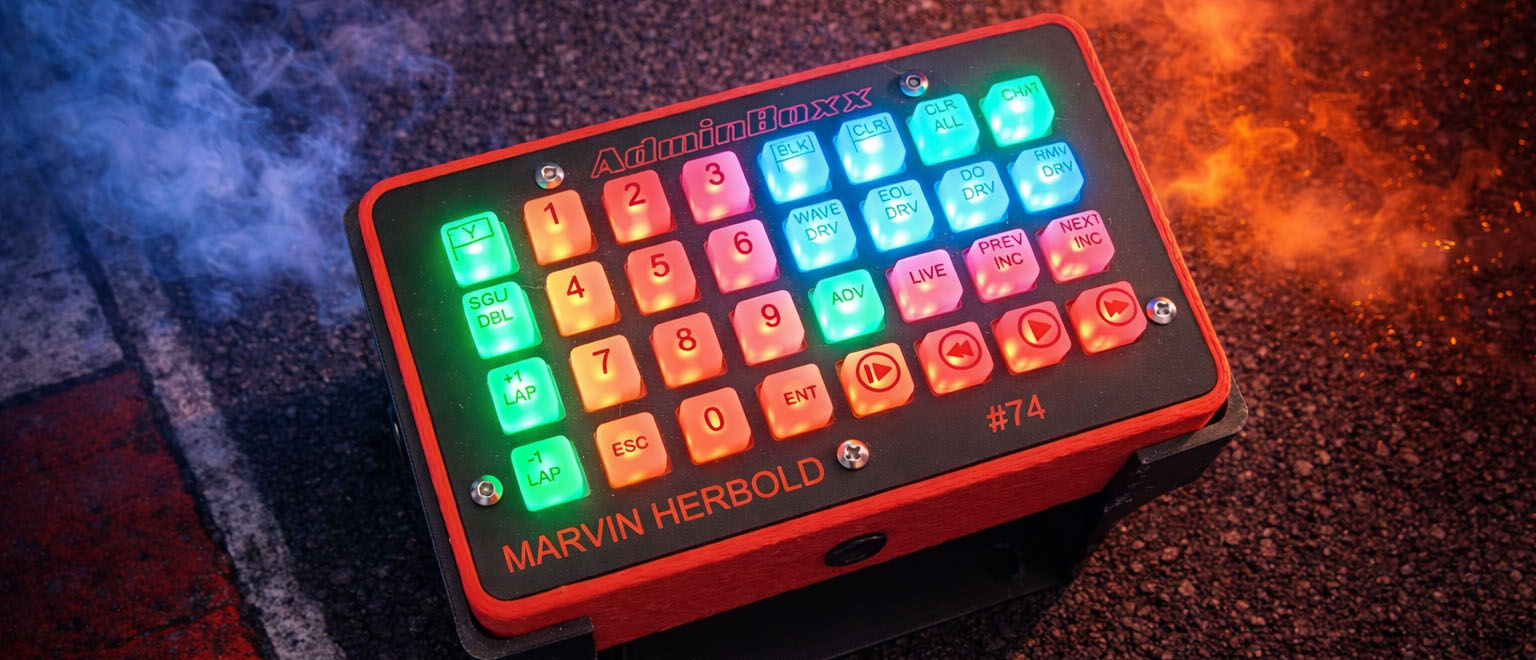
This page configures the AdminBoxx hardware integration. For more information about the AdminBoxx you can visit this page:
AdminBoxx is a dedicated USB race-control button box for iRacing. It combines LED button feedback, spoken/audio confirmations, and one-touch shortcuts for common admin actions such as cautions, penalties, wave-bys, session control, and replay navigation.
When connected, MAIRA controls the AdminBoxx LEDs, plays confirmation tones/voice prompts, reacts to iRacing session flags, and sends the appropriate admin chat commands on your behalf.
MAIRA can also automatically update the AdminBoxx firmware when the version on the device does not match the version bundled with the app.
CONNECTION
These settings control whether MAIRA should connect to the AdminBoxx hardware.
Connect to AdminBoxx
Turns the AdminBoxx connection on/off. The first connection attempt after MAIRA starts also scans your USB serial ports to find the device, so it can take a few extra seconds. If the device is not detected, MAIRA disables this control and shows Device missing.
Retry
When the device is not detected, a Retry button appears next to the connection switch. Press it to have MAIRA re-scan for the AdminBoxx hardware — for example after you plug it in or reconnect the USB cable. If the device is found, the switch is re-enabled and the Retry button disappears.
When MAIRA successfully connects, it enables LED control, starts keep-alive communication, requests the firmware version from the box, and enables the Test button.
Connect to AdminBoxx on app startup
If this is ON, MAIRA will try to connect to the AdminBoxx automatically when the app starts.
Default: OFF
Enable Xtreme Scoring Race Control integration
If this is ON, MAIRA hands race control over to Xtreme Scoring Race Control (XSRC). Instead of sending iRacing admin chat commands itself, MAIRA forwards each AdminBoxx admin action (such as yellow flag, black flag, clear flags, wave by, end of line, disqualify, remove driver, pace mode, caution laps, advance session, and chat toggle) to the running XSRC application, which then owns and issues the actual race-control commands.
Leave this OFF unless you are running Xtreme Scoring Race Control. When it is OFF, MAIRA sends the iRacing admin commands directly on your behalf.
Default: OFF
Test
Runs a built-in test cycle on the AdminBoxx. This waves a sequence of flags on the LEDs — one lap to green, green, yellow, one lap to green, green, white, and checkered — and plays the same tones you would hear when those flags come out for real, so you can verify that both the LEDs and the audio are working correctly.
This button is only enabled while AdminBoxx is connected.
DISPLAY
These settings affect the brightness of the AdminBoxx button LEDs.
Brightness
Adjusts the LED brightness of the AdminBoxx buttons.
Changing this immediately resends all current LED colors to the box using the new brightness value.
Default: 15%
AUDIO
These settings control AdminBoxx tones and spoken feedback.
All spoken feedback — confirmation phrases, driver numbers, and the digits you type on the keypad — is queued and played one clip at a time, in the order it happened. Nothing is cut off or talked over, even when you press several buttons in quick succession. The short tones and beeps are not queued, because they are timed to flash along with the button LEDs.
Volume
Adjusts the playback volume of AdminBoxx tones, replay beeps, and spoken confirmation phrases/numbers.
Changing this setting plays a short beep so you can hear the current level immediately.
Default: 75%
LINKS
Handy links related to AdminBoxx — the main AdminBoxx website, the AdminBoxx Discord server, and the Xtreme Scoring website. Clicking a link opens it in your web browser.
HOW ADMINBOXX WORKS
The AdminBoxx hardware is an 8×4 illuminated button matrix. MAIRA listens for button presses from the box, updates the button LEDs to reflect the current mode/state, and sends the matching iRacing admin commands through chat or replay control APIs.
Examples of supported actions include:
- Throw yellow / caution
- Black flag, clear flag, clear all penalties
- Toggle chat on/off
- Toggle single-file / double-file restart mode
- Wave by, end-of-line, disqualify, or remove a driver
- Adjust caution laps and advance to the next session
- Replay controls such as live, previous incident, next incident, slow motion, reverse, play/pause, and fast forward
Some actions require a car number. In those cases, AdminBoxx switches into a numpad entry mode. You enter the driver number on the illuminated keypad and then press Enter to send the command, or Escape to cancel it. Each digit you press is spoken back to you as you type.
iRacing tells MAIRA whether you have admin capabilities in the current session. If you do not, only the replay/playback buttons remain functional — all of the admin buttons light up red to show they are disabled, and pressing them does nothing.
AdminBoxx also reacts to simulator state. For example, it can animate flag colors for yellow/green/white/checkered-style events, show replay-mode indicators, and reflect whether chat is enabled or whether restart mode is single-file or double-file.
FIRMWARE UPDATES
After connecting, MAIRA requests the firmware version from the AdminBoxx device. If the version on the hardware does not match the version bundled with MAIRA, the app automatically starts a firmware update by sending the latest code to the device over USB serial.
During this process, the AdminBoxx status in MAIRA shows that the firmware is being updated along with a progress percentage that climbs from 0% to 100% as the new code is transferred.
When the transfer completes, MAIRA disconnects and the device reboots into the new firmware. Turn the Connect to AdminBoxx switch back on to reconnect. The box often comes back on a different COM port after a firmware update, so MAIRA re-scans your serial ports automatically if the first reconnect attempt fails.
Previous page: G Tensioner
Next page: Captions